Platform
The whole advice workflow, in one workspace.
PlanHouse is an AI-native workspace for AU and NZ advice firms. One record per client, transparent projections, AI-drafted documents — every output a draft for the adviser to review and own. Built around the licensed adviser, not around the AI.
The workflow, end to end
Ten stops, from opening a new client file to a compliance bundle ready on demand — the same shape on every client.
- Engage. Open the client, share a secure fact-find link, capture the brief.
- Discover. The client fills the fact-find themselves or you capture it in the meeting; each version is locked and time-stamped.
- Strategise. Adopt a strategy from your firm's library or draft one against the client's record — the approach you're taking, with its rationale and trade-offs, ready to flow into the SOA.
- Project. Model retirement scenarios in the projections workbench — tax, your retirement system, plus SMSF and trust structures — live in the browser, side by side.
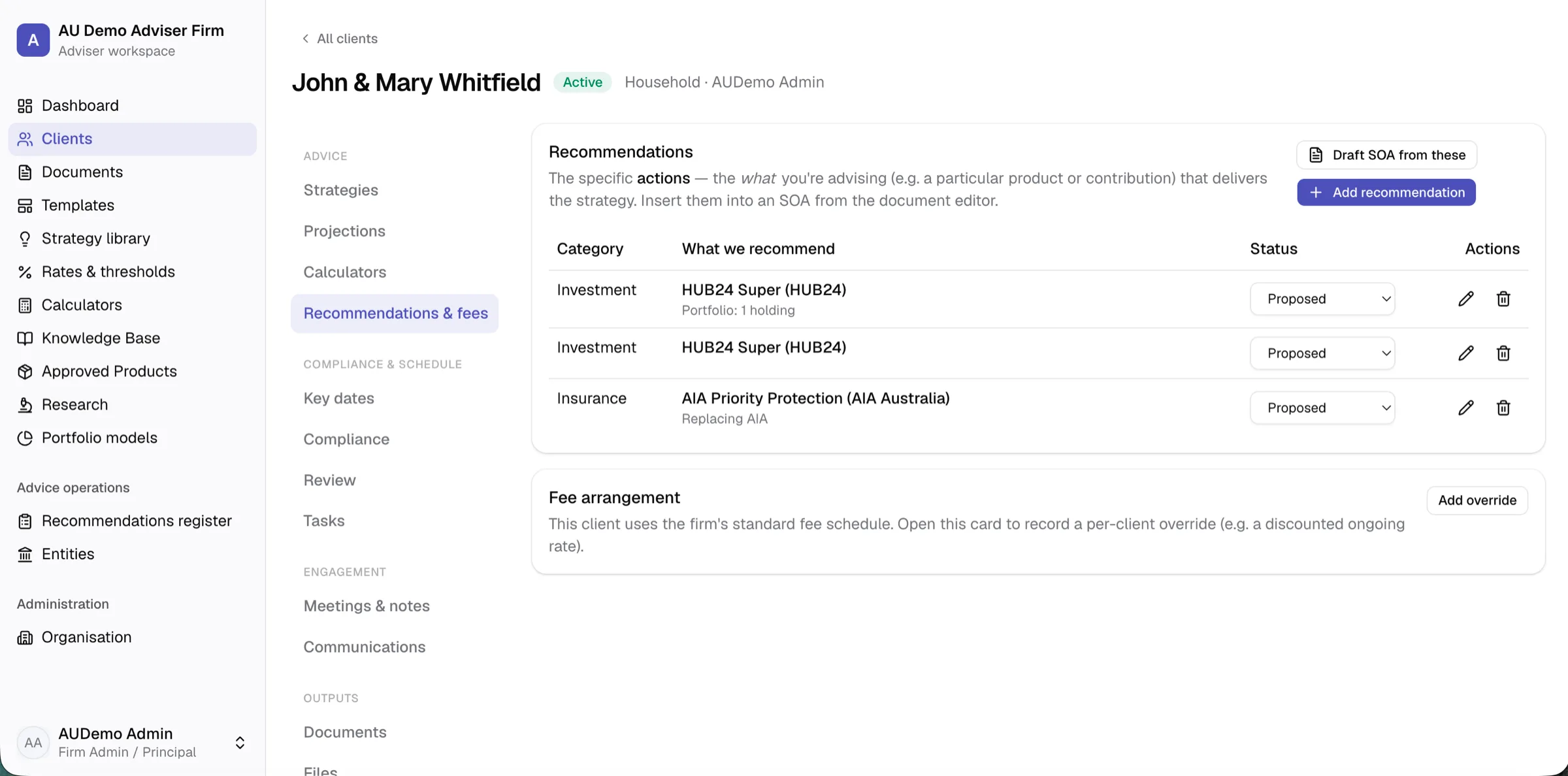
- Recommend. Record recommendations against your Approved Product List — they flow into the SOA as numbered tables, with switch comparisons, cost detail and a firm-wide register.
- Draft. SOA, ROA, review and engagement documents drafted section-by-section from versioned templates and the live record.
- Review. Peer or self review workflow, with template lineage so firm-wide drift is visible before issue.
- Issue. Branded PDF with cover, clickable contents and page numbers. The issued document is locked from edit.
- Accept. The client reviews the advice and records their authority to proceed — each recommendation captures their decision, with provenance, back on the record.
- Comply. A regulator-ready compliance bundle per client, on demand — every issued document, snapshot and note in one verifiable ZIP.
The client workspace
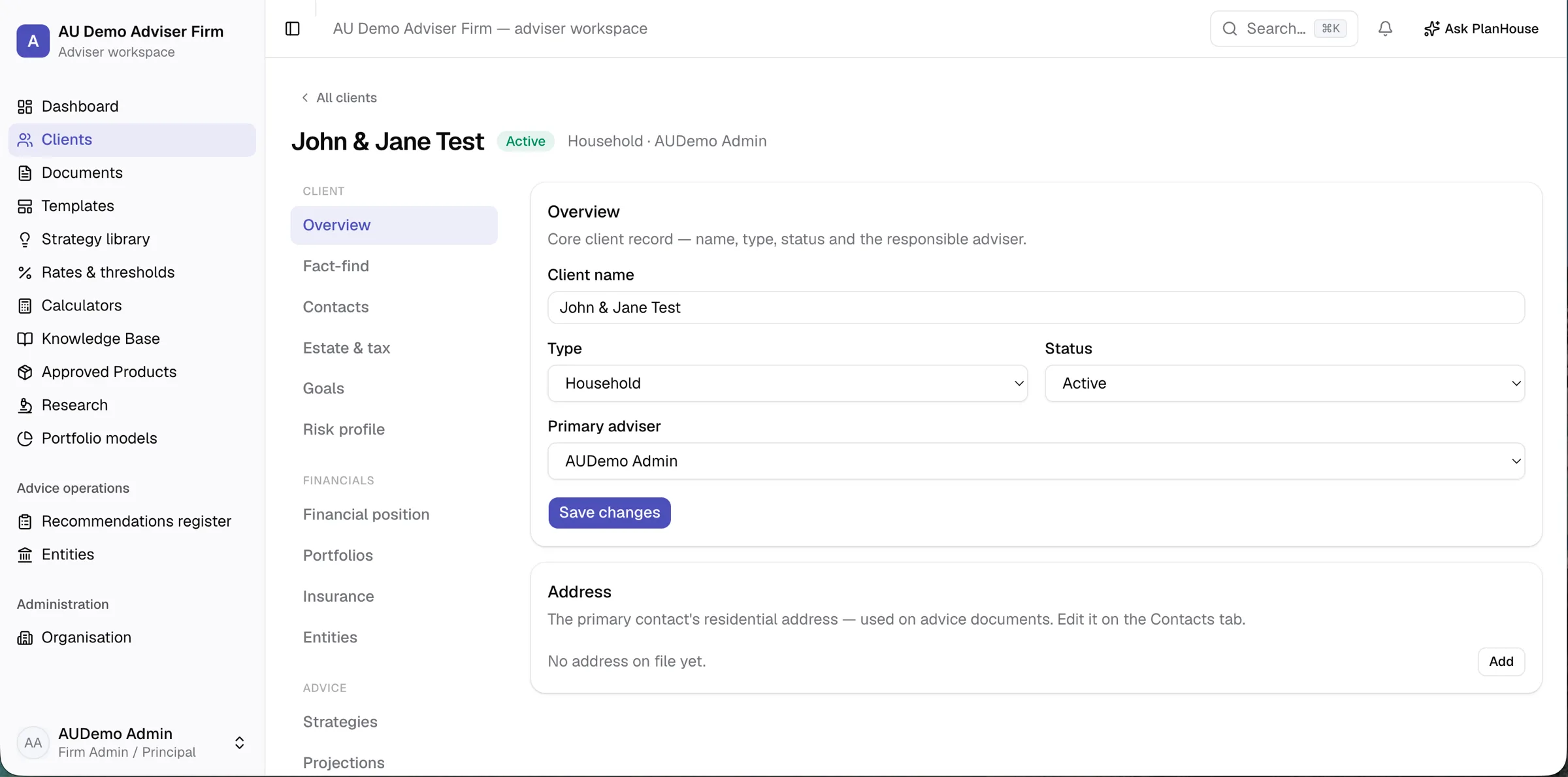
One record per client, with purpose-built sections grouped by the stage of the advice lifecycle — the client (overview, fact-find, contacts, goals, risk profile), their financials (position, portfolios, insurance, entities), the advice (strategies, projections, recommendations & fees), compliance & schedule, engagement (meetings & notes, communications) and outputs (documents, files, AI). The same left-nav-then-section shape on every client, so a paraplanner always knows where to find what they need.
Roles (firm admin, adviser, paraplanner, client service and read-only) are enforced in the platform itself, not just hidden in the UI. Client-level sharing decides who sees whose book — the default is the owning adviser; firm admins see everything; other staff are added by share.
AI grounded in the actual record
Every AI output is a draft for adviser review. The adviser is the licensed party and remains responsible for the advice — PlanHouse drafts, suggests and prepares, never finalises and never speaks to the client on your behalf.
A firm-wide assistant ("Ask PlanHouse") and a per-client chat both read the same structured record you do, so the figures they cite match the record instead of being generated. Section-by-section drafting writes advice documents from that record; a meeting assistant turns a transcript into a file note; and a fact-extraction pass proposes structured updates from a conversation or an uploaded document. Conversations persist per client, and firm-wide and per-client AI instructions let your firm pin its tone and house views without re-prompting every time.
It also reads your documents. Upload a PDS, TMD or research note and the assistant searches and answers from it — citing the exact source and page, with a click-through — so an adviser can ask “given this client’s income protection, what does the PDS say about the waiting period?” and get an answer grounded in the firm’s own library, not invented. Answers come back formatted — including side-by-side tables when you ask to compare — and when you ask about a product’s fees, the assistant checks the figure on your Approved Product List against the PDS and flags any discrepancy for you to confirm.
Built-in safeguards stop uploaded files, meeting notes and client-entered text from steering the assistant off-task — content the user typed is treated differently from instructions you gave the AI. The whole AI layer is a module: your firm can switch it off, or switch on only the parts you want.
From conversation to facts
Record a meeting — paste a transcript or upload a Teams / Zoom caption file or a recap document — and PlanHouse keeps the raw conversation as evidence, then drafts a structured file note (attendees, discussion, circumstances, advice discussed, agreed actions, disclosures) and follow-up tasks for you to review and save.
From that same conversation — or an uploaded client document like a statement or a previous SOA — it proposes structured updates to the client record: a new portfolio balance, a changed salary, an added policy. Every proposal is backed by the exact words it came from (checked verbatim against the source, so a hallucinated fact can’t slip through), shows current → proposed, and is yours to apply, edit or dismiss. A statement dated last year applies as history, not as today’s balance; a material reversal is flagged louder. Nothing is written automatically.
Projections engine
Transparent, repeatable retirement, tax and contribution modelling for your jurisdiction — current financial-year rates, indexed forward year by year — running live in the browser, with no waiting on a server every time you move a slider. It models structures too: SMSFs and family, unit and testamentary trusts, with distributions, dividend-credit treatment and income attributed per person at each owner’s marginal rate.
A full-screen scenario workbench compares retirement scenarios side by side, with charts and a year-by-year cashflow table you can expand and export to CSV. The assumptions, the year-by-year numbers and the chart drop directly into an SOA as document sections — with the relevant structure disclosures generated alongside — so projection numbers no longer have to be copied out of a separate tool and re-formatted by hand.
Calculators
Alongside the full scenario workbench, a set of standalone calculators — income tax, superannuation and contributions, KiwiSaver, Age Pension, Division 296 and residential aged-care fees — for the quick answer that doesn’t need a full projection. Each pre-fills from the client record and reflects the current financial year.
A public retirement calculator can be shared from your own website, so a prospect can model their retirement, see the numbers, and arrive already in your pipeline.
Document engine
SOA, ROA, review report, annual-review pack and engagement / scope-of-advice templates, with merge fields that pull from the live client record. Each jurisdiction has its own document set, carrying native disclosures for its regime — not one country’s wording with the rates swapped. Peer review (submit → approve → issue) or self review, configurable per firm: paraplanners can move a document to “In review”; only an adviser can approve and issue.
Branded PDF generation with a cover page, a clickable contents page
and page numbers — one section per page, your firm logo, adviser
details, page footers. Any document also exports to an editable Word
(.docx) copy — a clean handoff for firms that finalise, print or send
from Word — while the issued PDF stays the locked, immutable record.
Every document remembers the template version it came from; if a firm
template drifts from the master it’s based on, you see it in
/templates
and can adopt the change or keep your version with one click. Issued
documents are locked from edit and kept as immutable artifacts.
Recommendations & acceptance
Recommendations are structured records built from your Approved Product List — a switch, a roll-in, an insurance bundle, a contribution change. They flow into the SOA as numbered tables the advice prose can cross-reference, with the costs section auto-summed from the products you chose, so the AI elaborates the reasoning and never has to reach for the figures.
Where a recommendation replaces something, a side-by-side comparison sets out the trade-offs — fees, lost benefits, fresh underwriting — to the replacement-disclosure standard your regulator expects. Once the document is issued, the client reviews it and records their authority to proceed; each recommendation captures the client’s decision with provenance. When you implement, PlanHouse records the placed position against the advised one, creates the new account or policy and archives the replaced one — and a firm-wide register answers questions the prose-only world never could, like “which clients did we move out of a given product last quarter?”
Where a recommendation is an investment, you can record the recommended portfolio itself — each fund, SMA, direct share, term deposit or cash holding with its weight and cost, picked from the research library or entered directly. The all-in cost is summed for you and the holdings render into the SOA as a portfolio table; for a discretionary (MDA / DIMS) mandate the disclosure adjusts accordingly.
Research library
In-house investment research, built from primary sources rather than a reseller feed. Managed funds and model portfolios across AU and NZ carry fees, historical returns (labelled as past performance, with the as-at date), and risk and growth/defensive positioning — each traceable to the source document it was drawn from. A live shares & ETFs lookup spans the ASX, NZX and US markets — current price, a price chart, trailing total returns and fundamentals — so an adviser can research a holding without leaving the workspace.
Research stays research: it informs the advice, it isn’t advice, and nothing here is a recommendation until an adviser makes it one.
Portfolio models
Build a model portfolio once and reuse it. Pull holdings from the research library or the live shares & ETFs lookup, or enter them by hand; PlanHouse computes the blended fee, the growth/defensive split with a risk-band label, and the model’s historical returns as you build. Models are firm-wide house models — published by an admin — or an adviser’s own, and a firm model can be cloned as a personal starting point.
When you advise, start a client’s recommended portfolio from a saved model: the holdings and costs snapshot onto the advice, so a later change to the model never rewrites an issued document.
Compliance, audit and the regulator bundle
Each fact-find is snapshotted in time and locked from edit, so the version of the client’s circumstances the advice was built on is preserved. The compliance register tracks fee consent and fee disclosure, account-level tax declarations, document approvals and issues — all written to a tamper-resistant audit trail scoped to your firm and downloadable as CSV.
Each client has a one-click compliance bundle: a ZIP of issued PDFs, fact-find snapshots, file notes, the compliance register and the activity timeline, with a verification fingerprint on every file. Anyone — you, the client, a regulator — can confirm a file hasn’t been altered since it was issued. A firm admin can also permanently erase a client on request, with the erasure itself kept in the audit trail.
Identity & AML
A customer-due-diligence workspace in each client’s compliance area. PlanHouse works out who must be identified from the client’s entity graph — beneficial owners, trustees, directors — then walks the adviser through documentary verification into an encrypted ID vault (files scanned for malware, then sealed; viewed only through an access-controlled, audited route), a deterministic risk scorecard, PEP and sanctions checks, and an immutable sign-off that updates the compliance register. The adviser is always the verifier — nothing auto-clears — and the jurisdiction-specific pieces (an AU sanctions-list check, NZ customer due diligence) follow the firm’s regime.
Communications
Capture client email onto the file: drag a message straight out of Outlook (or upload an .eml) onto the client and it’s parsed, de-duplicated and filed, with attachments individually scanned for malware and the original kept as evidence. A client’s known email addresses are gathered in one place, so the right correspondence lands against the right client.
Approved Product List and Strategy Library
A firm-wide Approved Product List with Best Interests Duty rationale, research basis and document attachments — so paraplanners and advisers draw from the same approved set, with the reasoning attached to each product. Fees can be recorded as a flat rate or a structured tiered schedule, so a stepped platform fee carries through to the modelling and the advice rather than living in a footnote.
A reusable strategy library captures the firm’s house views — salary-sacrifice patterns, debt-recycling structures, insurance-gap framing, contribution splitting — for the assistants to draw from when drafting, so advice across the firm reads consistently.
Client-fillable fact-find
Send the client a secure link that expires. They fill the fact-find in their browser — no account, no app to install — and the structured answers land straight in the workspace, starting the engagement. The adviser sees progress as it arrives.
The fact-find reaches past position and cashflow to the estate and tax picture — wills and enduring powers of attorney, tax residency, superannuation death-benefit nominations, and an encrypted tax file number / IRD number held adviser-side and never asked of the client — so the record carries what best-interest advice actually needs.
Built for AU and NZ
Your firm picks a jurisdiction at sign-up; rates, templates, demo data, disclosure wording and timestamp formatting follow automatically. The product reads in plain language throughout — the jurisdiction-correct specifics are below, so an adviser sees their own regime rather than both countries’ terms in every sentence.
| Australia | New Zealand | |
|---|---|---|
| Retirement system | Super + Age Pension | KiwiSaver + NZ Super |
| Tax model | PAYG, marginal rates, super, franking, Division 296 | PAYE, marginal rates, KiwiSaver, PIE / PIR, imputation |
| Disclosure regime | ASIC RG 90 / RG 175 | FMA disclosure — FAP / FSP, dispute scheme, Schedule 21A |
| Advice documents | SOA, ROA, review report | Risk, investment / KiwiSaver & comprehensive SOAs, NZ review record |
| Replacement comparison | s947D replacement-product disclosure | Schedule 21A commission disclosure + FMA-expected axes |
| AML / CDD | DFAT sanctions check + AU identification record | NZ CDD: risk scorecard, PEP / sanctions attestation |
| ID documents | Medicare and AU document types | RealMe and NZ document types |
| Time zones | AEDT / AEST | NZDT / NZST |
| Demo data & templates | AU | NZ |
Modular by design
Core is always on — clients, dashboard, documents. AI assistants, knowledge base, projections, meeting notes, client-fillable fact-find, the research library, portfolio models, calculators and the annual review pack toggle per firm. A smaller practice can run lean; a larger one can switch the lot on.
Licensees and advice networks
PlanHouse runs above the practice, too. A licensee — an AU AFSL or NZ FAP holder with practices operating under it — gets a read-only oversight console across its firms: the practice roster, each firm’s activity and open compliance alerts, and a read-only “view as firm” — without ever editing a practice’s advice. The firm always owns its client work; the licensee observes and governs.
Governance flows down, per item. The licensee sets its approved product list, advice templates and house model portfolios once and pushes them to member firms — as a recommendation a firm can adopt, or a mandatory standard it works within — and each firm’s licence identity and disclosures are inherited from the licensee automatically. Onboarding a licensee brings its practices with it.
Security and operations
Australian (Sydney) hosting and Oceania file storage, four layers of encryption, multi-factor authentication available to every user and enforceable firm-wide, an append-only audit trail, malware-scanned uploads. Full detail on the security page.
PlanHouse is built for advisers and the firms behind them — adviser-in-the-loop on every AI output, designed around the legal and compliance shape of advice in AU and NZ. We’re in private beta and provisioning new firms after an introductory call.